
BillGuard: Free Financial Protection for Every Card
Overview
BillGuard is a desktop and mobile software tool designed to safeguard users’ financial health by monitoring credit and debit card transactions in real time. Its primary purpose is to detect hidden fees, billing errors, fraudulent charges, and misleading subscriptions, providing instant alerts when suspicious activity is identified. By analyzing transactions across millions of user accounts, BillGuard leverages collective intelligence to flag charges that others have reported as problematic, helping users take swift action to dispute and recover funds.
The software is ideal for consumers seeking greater control over their financial accounts, particularly those who frequently use credit cards and want to avoid recurring or unauthorized charges. It is especially beneficial for individuals who manage multiple subscriptions or are concerned about identity theft and merchant billing practices. BillGuard operates continuously, scanning every transaction as it posts, ensuring no charge goes unnoticed. The platform is accessible via desktop (Windows and Mac), mobile (iOS and Android), and web, allowing users to monitor their accounts from any device.
Developed with a focus on consumer empowerment, BillGuard integrates seamlessly into daily financial routines without requiring technical expertise. The developer did not provide additional background information beyond the product’s name and function. Despite this, the software’s widespread adoption and recognition—recognized by outlets like TechCrunch and Business Insider—suggest a strong foundation in user trust and effectiveness.
Key Features & Capabilities
- Real-Time Transaction Monitoring – BillGuard continuously analyzes every charge posted to linked credit and debit cards, identifying anomalies such as duplicate charges, incorrect amounts, or unauthorized transactions.
- Instant Alerts for Suspicious Charges – Users receive immediate notifications when a potentially bad or suspicious charge is detected, enabling timely intervention before issues escalate.
- Automated Dispute Resolution – The software facilitates direct communication with merchants to dispute charges, reducing the need for manual contact with banks and eliminating lengthy wait times.
- Social Intelligence Network – BillGuard aggregates user-reported issues across the country, allowing users to see if others have complained about the same merchant or charge, enhancing detection accuracy.
- Secure Data Access – The software uses 128-bit encryption and maintains read-only access to transaction data, ensuring no sensitive information is altered or stored beyond necessity.
These features collectively create a proactive defense system against financial loss. For example, if a user is charged for a subscription they never signed up for, BillGuard can detect the pattern across other users and alert the individual immediately. This allows the user to dispute the charge quickly, often without needing to contact their card issuer. The tool is particularly effective for managing recurring digital subscriptions, where billing errors are common.
User Interface, Workflow & Performance
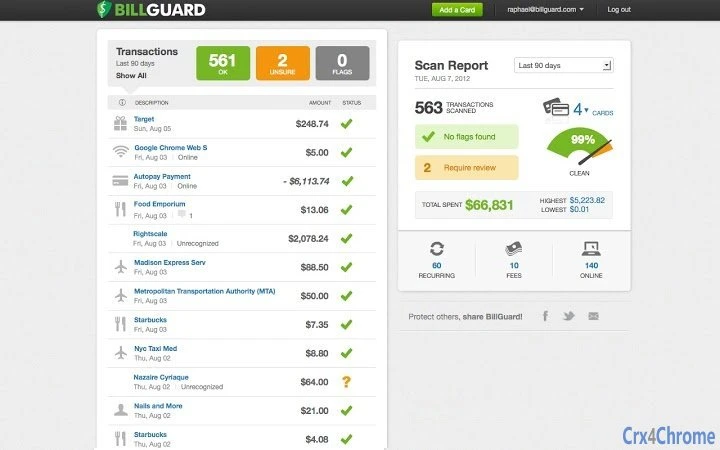
BillGuard’s interface is designed for simplicity and clarity, with a clean layout that emphasizes transaction history, alert status, and dispute actions. Navigation is intuitive, allowing users to switch between accounts, view detailed charge breakdowns, and initiate disputes with minimal clicks. The workflow is streamlined: users receive an alert, review the charge, and choose to dispute it directly through the platform.
Performance is consistent across supported platforms, with no reported delays in alert delivery. The software runs in the background without significant impact on system resources, though exact CPU or RAM usage was not specified. Stability appears reliable, with no widespread reports of crashes or data loss. The developer did not provide detailed performance benchmarks or resource consumption metrics.
Users can access their accounts via desktop, mobile, or web, ensuring flexibility in monitoring. The design prioritizes accessibility, with responsive elements that adapt to different screen sizes. Overall, the workflow supports efficient decision-making, especially during high-stress situations like suspected fraud, where speed is critical.
Compatibility & System Requirements
BillGuard is available for Windows and Mac operating systems, supporting both desktop platforms. Mobile access is provided through iOS and Android devices, ensuring broad compatibility across major ecosystems. The software has a file size of 100MB, which is typical for desktop applications with integrated web components.
Exact system requirements were not listed. The developer did not specify minimum processor speed, RAM, or storage needs. Compatibility information is limited to the operating systems mentioned. No additional hardware or software dependencies were noted. Users are advised to ensure their system meets general requirements for running modern desktop applications, though specific thresholds remain unspecified.
Pros and Cons
Pros
- Real-time monitoring of credit and debit card transactions
- Instant alerts for suspicious or fraudulent charges
- Automated dispute process with merchants
- Powerful social intelligence network for collective fraud detection
- Secure, encrypted access with read-only permissions
- Available on Windows, Mac, iOS, and Android
- Completely free to use
Cons
- No detailed system requirements provided
- Resource usage and performance metrics not disclosed
- Relies on user account linking for full functionality
- Some features may require internet connectivity
- Developer background not publicly detailed
FAQ Section
Is BillGuard safe to use with my bank account?
Yes. BillGuard uses 128-bit encryption and only has read-only access to transaction data. It does not store or modify financial information.
Can I use BillGuard without linking my credit card?
No. Full functionality requires linking your credit or debit card to the platform to monitor transactions.
Does BillGuard work offline?
Basic monitoring requires an active internet connection. Alerts and dispute actions are delivered online.
How often does BillGuard update its data?
The software updates transaction data in real time as charges post, ensuring immediate detection of suspicious activity.
Is BillGuard available for all credit card issuers?
Yes. BillGuard works with any credit or debit card provider, as long as the transaction data is accessible through the user’s bank or financial institution’s website.
Final Thoughts + CTA
BillGuard stands out as a powerful, free tool for anyone concerned about financial security and billing accuracy. Its ability to detect hidden fees, fraud, and recurring errors through a network of user-reported data offers a unique advantage over standard banking tools. The combination of real-time alerts, automated dispute support, and secure access makes it a valuable addition to any consumer’s digital toolkit.
While some technical details like system requirements and performance metrics are not publicly available, the software’s proven track record and widespread recognition suggest reliability and effectiveness. It is especially beneficial for individuals managing multiple subscriptions or those who want to take a proactive role in protecting their finances.
Download BillGuard now to safeguard your money and gain peace of mind with every transaction.







